Plugin Structure
Open ${ROOT}\qfield_vegetation_monitoring in Visual Studio Code or your preferred IDE and take a look at the layout:
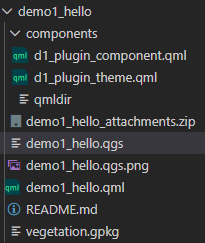
- The main QML file is demo1_hello.qml. It must have the same name as the project and must be saved in the project directory with the project file.
- All other QML files are stored in the components subdirectory.
- This subdirectory must be added as an attachment directory in the project.
Globally Imported Classes are Defined in qmldir
The qmldir file is basically a global import directive.
d1_plugin_theme.qml contains a style definition object that includes colors and fonts that we will use consistently in our plugin. It's like a CSS file.
The qmldir file defines d1_plugin_theme.qml as a module that is used globally and automatically imported. It defines that the root element of this file is imported and referred to in the code as a PluginTheme object.
Note that d1_plugin_theme.qml has no reference to the class name PluginTheme. This is only defined in the qmldir file.
Definition of PluginTheme in qmldir
singleton PluginTheme 1.0 d1_plugin_theme.qmlContents of the PluginTheme File Have No Reference to PluginTheme
pragma Singleton
import QtQuick

QtObject {
    readonly property color vanilla: "#ffecd1"
    readonly property color green: "#6baa75"
    readonly property color white: "#ffffff"
}