d1_plugin_component.qml
That was a lot of theory, I know. But I think we've now covered enough of the QML structure that the rest will go much faster.
Let's look at the plugin code that is loaded by the pluginLoader.
It's quite simple. Just a simple screen with a label that expands to the screen.
< ... Imports ...>

Rectangle {
    id: pluginFrame
    anchors.fill: parent
    color: PluginTheme.vanilla
    Text {
        text: "Vegetation Monitoring: Plugin Component"
        color: PluginTheme.green
        font.pixelSize: 20
        horizontalAlignment: Text.AlignHCenter
        anchors.centerIn: parent
    }
    Component.onCompleted: {
        iface.logMessage("d1_plugin_component.qml loaded")
    }
}
Here you don't have an Item, but a Rectangle, which is an Item, just as a QtFrame is a QtWidget.
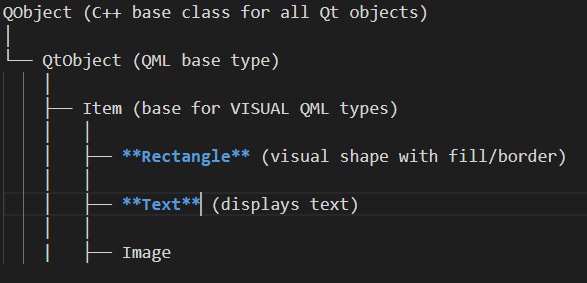
A QML Textbox
Our simple screen with a label is just a textbox. There is no TextBox in QML. We need 2 objects: Rectangle and Text.
Using PluginTheme
We discussed in Plugin Structure the definition of PluginTheme as a configuration object that contains our color palette. In d1_plugin_component you see that the color of the Rectangle is set to PluginTheme.vanilla and the color of the Text is set to PluginTheme.green. Very simple.