Demo 2
Feature Selection
Interaction with the Map and Features
What We Will Learn
- How to access a project layer through the QField interface
- How to query features from a layer
- How to select objects from the map canvas with a point handler
1. Layer Query via qgisProject Object
// imports qgisProject
import org.qfield
// get QgsVectorLayer by name
let layer = qgisProject.mapLayersByName("plots")[0]
- qgisProject is a real QgsProject type
- C++ Class Reference marks functions with Q_INVOKABLE that are callable in Javascript (and QML)
1. Feature Query via LayerUtils
//imports LayerUtils
import org.qfield
// build your expression just like in QGIS
let expression = "plot_id = 'plot_123'"
// create feature iterator from expression
let it = LayerUtils.createFeatureIteratorFromExpression(layer, expression)
if (it.hasNext()) {
// Real QgsFeature
const feature = it.next()
it.close()
}
it.close();
- createFeatureIteratorFromExpression returns a real QgsFeature Iterator object
- it.next() returns a real QgsFeature object
- Never forget to close the iterator (avoid crashes)
Intercepting Map Interactions with pointHandler
// imports iface
import org.qfield
Item {
// 1. Add the pointHandler to the plugin
property var handler: iface.findItemByObjectName("pointHandler")
Component.onCompleted: {
// 2. register the point handler and define its callback
handler.registerHandler("demo2_selection", (point, type, interactionType) => {
if(point === "the right point"){
// block other handlers
return true
}
else {
// not using the point, pass event to other handlers
return false
}
}
});
// 3. Deregister the point handler on destruction (project close)
Component.onDestruction: {
handler.deregisterHandler("demo2_selection");
}
}
Intercepting Map Interactions with pointHandler
- 1. Get pointHandler from iface.findItemByObjectName("pointHandler")
- 2. Register the pointHandler and define the callback
- 3. In callback, return true to consume the event, or false to pass it on
- 4. Deregister the pointHandler on destruction (project close)
Point Handler interactionType
var isMobile = Qt.platform.os === "ios" || Qt.platform.os === "android"
var shouldHandle = (isMobile && interactionType === "doubleClicked") ||
(!isMobile && interactionType === "clicked")
- "clicked":
- Windows and Ubuntu Desktop App: Works
- iOS: Feature drawer appears over plugin
- "doubleClicked":
- Windows and Ubuntu Desktop App: Ignored
- iOS: Works
- "pressAndHold":
- Windows: Ignored
- iOS: Object context menu blocks plugin.
Android not tested (but probably similar to iOS)
Point Handler Coordinates
let mapCanvas = iface.mapCanvas()
handler.registerHandler("demo2_selection", (point, type, interactionType) => {
// 20 pixel tolerance box
let tl = mapCanvas.mapSettings.screenToCoordinate(Qt.point(point.x - 20, point.y - 20))
let br = mapCanvas.mapSettings.screenToCoordinate(Qt.point(point.x + 20, point.y + 20))
let topleft = tl.x + " " + tl.y
let topright = br.x + " " + tl.y
let bottomright = br.x + " " + br.y
let bottomleft = tl.x + " " + br.y
let wkt = "'POLYGON((" + topleft + ", " + topright + ", " + bottomright \
+ ", " + bottomleft + ", " + topleft + "))'"
let expression = "intersects(geom_from_wkt("+wkt+"), $geometry)"
let it = LayerUtils.createFeatureIteratorFromExpression(layer, expression)
}
Passing Data to Component
Loader {
id: pluginLoader
source: Qt.resolvedUrl('./components/d2_plugin_component.qml')
}
pluginLoader.item.plotId = feature.attribute("plot_id")
pluginLoader.item = Root element of the Component
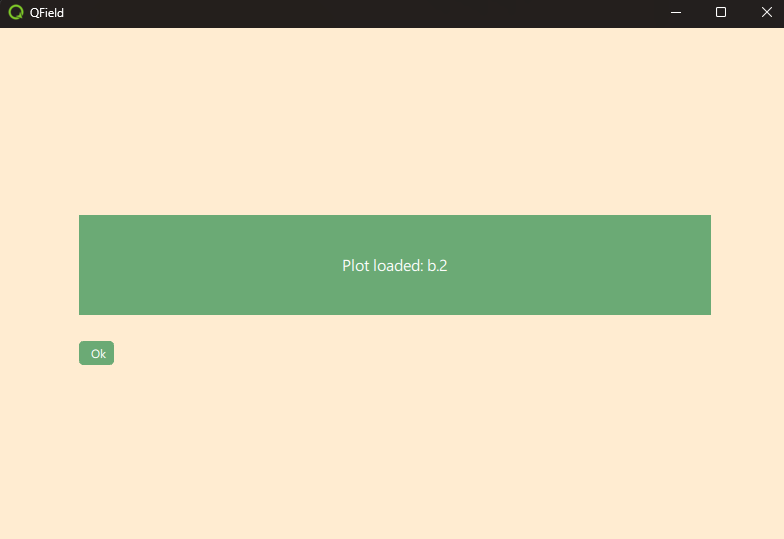
Property Binding in Component
// d2_plugin_component.qml
Rectangle {
id: pluginFrame
property string plotId: ""
Text {
id: messageBox
text: "Plot loaded: " + pluginFrame.plotId
// Automatically updated!
}
}
Note the difference from imperative assignment: Property binding makes UI updates automatic!
Custom Signals
Closing the plugin with a button:
// In Component: Define signal
Rectangle {
id: pluginFrame
signal closed()
Button {
onClicked: { closed() }
}
}
// In Plugin: Connect signal
Item {
id: plugin
Loader{}
Connections {
target: pluginLoader.item
function onClosed() {
pluginLoader.active = false
}
}
}
Too many different mechanisms for interactions? Yes, I think so too.
Exercises for the Next 20 Minutes
Tasks:
- Exercise 1: Deploy Demo2 plugin and test
- Exercise 2: Display pixel coordinates and map coordinates in text
- Exercise 3: I count 3 mechanisms for signal/slot interactions. How many do you know?
- Exercise 4: What's the difference between Property Binding and Imperative Assignment?
Detailed Instructions: https://heatherhillers.github.io/workshop_qfield_plugins_de/guide/demo2/demo2_intro_EN.html