Demo 2a
Create, Read, Update, Delete
What We Will Learn
- How to add a row to a table
- How to update a row
- How to delete a row
The most important demo for custom forms
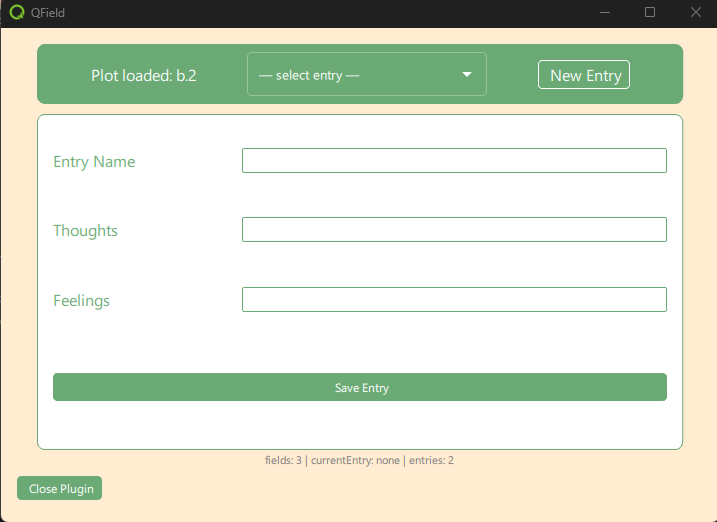
What Does the Plugin Do?
- Get plot ID from parent plugin
-
Populate the menu with rows for the plot from the table
entries - New Entry Button: Creates a new, empty entry
- Menu Selection and New Entry Button: Loads entry values into the form
- Save Entry Button: Updates entry from the form
Plugin Architecture: Three Files, Three Roles
-
FormDataModel — d2a_data_model.qml
“What fields does the form have?”
A static JS array of field descriptors (name, label). Drives the Repeater — no logic, no runtime state.
-
View — d2a_plugin_component.qml
“How does the form look?”
Layout and widget bindings. A Repeater iterates FormDataModel.fields to create one FormField per entry. Each input reads from and writes back to the Controller.
-
Controller — d2a_form_controller.qml
“What values do the fields hold, and how are they saved?”
Owns the runtime edit buffer (
fieldValues) and the dropdown list (entryListModel). Handles all QField API calls: create, load, save, delete.
Model
The Model configures inputs to the form. It is used by the Repeater to dynamically create input widgets for each layer attribute in the entries table.
Plugin Component with Model and Controller
The Plugin Component is our View. It contains the Model and Controller.
- View uses Model to build Form
- Controller contains processing code
Model-View Binding using Repeater
The Repeater element in QML allows you to dynamically create multiple instances of a component based on a model. This is useful for creating forms where the number of sections or fields can vary.
- Configuration defined in DataModel
- Repeater iterates and creates input objects dynamically
⚠️ Warning
Never bypass the QField API
Never access through the data provider
Why?
- QField Sync is based on QGIS Offline Editing
- Direct changes are not detected
- Synchronization will overwrite your data
Always use FeatureUtils & LayerUtils
CREATE: Insert Feature
READ: Get Feature
ALWAYS close iterator
UPDATE: Update Feature
DELETE: Delete Feature
Important Warning: Field Index
Never use hard-coded indices
Index in QGIS is not the same as index in QField.
❌ WRONG:
✅ CORRECT:
Exercises for the Next 60 Minutes
Tasks:
- Exercise 1: Deploy and test the Demo2a plugin
- Exercise 2: Add an element to the form using the Model
- Exercise 3: Remove an element from the Form
- Exercise 4: Insert a Default value for the header description, using the Model and View
- Exercise 5: Build your own plugin.